


CutAI - AI Hair Style Changer
2.823.00 Reviews
App Specs
- Version
- 2.2
- Updated On
- License
- Free
- Downloads
- 50,000+
- Developer
- TechMatrix
- Categories
- Beauty
- Platform
- Android
Screenshots
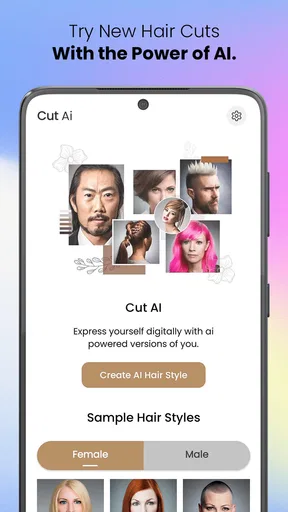
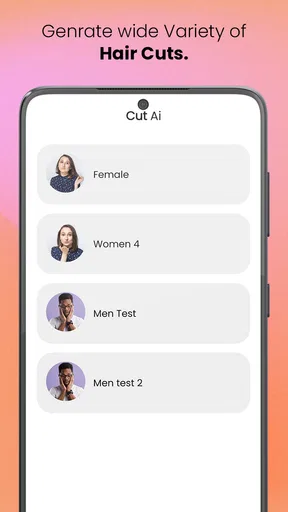
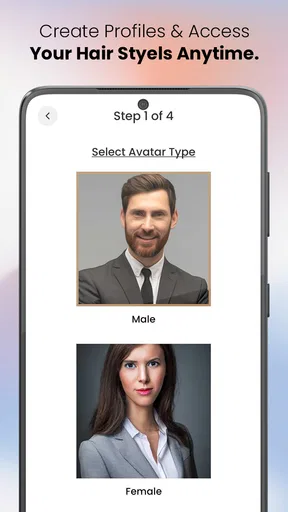
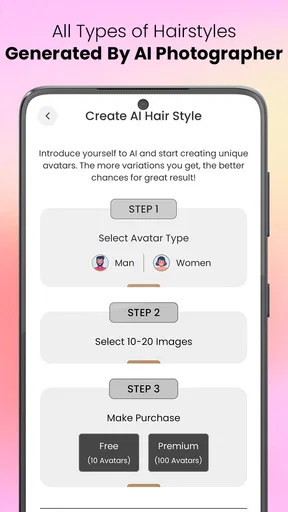
 Analysis by AppCompare
I’d treat CutAI - AI Hair Style Changer as a visual starting point, not a promise of what a salon result will look like. The idea is simple: use a photo of yourself to explore possible haircuts before making a real change. That can be genuinely useful when you are torn between a few options, though the usefulness depends on choosing a good photo and keeping realistic expectations about what an AI preview can show.
Before you choose a style, choose the right photo
The most important decision happens before browsing the looks: pick an image that gives the app a clear view of your face. A bright, evenly lit selfie with your head facing forward is a better starting point than a dim picture, a strong side angle, or a shot with hair covering much of your face. That isn’t just a technical nicety. The image is the reference for the preview, so a distracting angle can make it harder to judge whether a cut suits you.
I’d also take a moment to think about what you want to learn from the experiment. Are you deciding between a shorter length and keeping your hair long? Trying to see whether a fringe would change the shape of your face? Or simply curious about a different color? A focused question makes it easier to compare results instead of tapping through styles at random.
Getting Started with CutAI
First things first, CutAI - AI Hair Style Changer is available for both Android and iOS, so you can download it from your respective app store. Once installed, it's a pretty straightforward setup. You just need to snap a selfie or upload a picture where your face is clearly visible. The app's interface is clean and easy to navigate, which is a big plus if you're not exactly tech-savvy.
CutAI is a free beauty app from TechMatrix, and its current version is 2.2. It is rated for Everyone and supports Android 6.0 and up. The app has an average rating of 2.8 from around 575 ratings, with over 50,000 installs. Those figures suggest it has reached a meaningful audience, but the modest average rating is worth keeping in mind: I would approach it as a tool to experiment with rather than rely on it for a precise, salon-ready prediction.
Exploring the Features
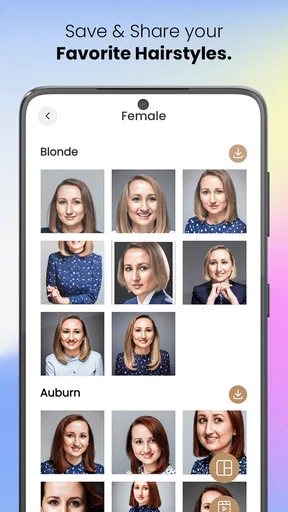
The app boasts a wide array of hairstyles to choose from. Whether you're into short bobs, long luscious locks, or even edgy cuts, there's something for everyone. One thing that really impressed me was the diversity in styles. It seems like the developers really went out of their way to include options for all hair types and textures.
After selecting a style, the app uses AI to adjust the hairstyle to fit your head shape and position. The accuracy is surprisingly good! The hairstyle aligns perfectly with your head and face, making it look almost real. It's like having a magic mirror that lets you experiment with your look without any risk.
Worth Reading Before You Choose

EA SPORTS FC Mobile 26 Is a Bigger Football Game, but It Takes Time

Flipboard Shows What News Apps Must Do Beyond the Feed

Switching to Android Auto Means Rethinking Your Driving Routine

Google Calendar Makes a Crowded Week Easier to Manage

Ludo King Makes the Most of the Minutes Between Plans

Baby Panda World Brings Quick Play to Modern Phones, but Its Game Library Feels Busy
For a useful comparison, don’t judge each option as a standalone makeover. Keep the same photo while you test different cuts, then compare the images together. Changing both the picture and the hairstyle makes it difficult to tell whether a result looks better because of the cut or because the lighting and angle changed. This simple side-by-side habit can make the app more useful for narrowing down choices.
There is another practical limit to bear in mind: a preview can suggest the overall outline, but it cannot tell you exactly how your own hair will behave after a real cut. Natural texture, styling habits, and the way you wear your hair day to day matter. I’d use the image to identify a shape or length worth discussing, rather than treating it as a technical instruction for a stylist.
Customizing Your Look
But the fun doesn't stop at choosing a new style. You can also play around with colors. Ever wondered if you'd look good as a redhead? Or maybe you want to try some trendy highlights? The color-changing feature is intuitive and gives you a realistic preview. You can even adjust the intensity of the color to see how subtle or bold you want to go.
When comparing colors, I’d try to keep the photo and the haircut consistent so the color is the only thing you are evaluating. A bright, even image is especially helpful here, since shadows can make shades look different from one part of the hair to another. If you are considering a big change, compare a more restrained option with a bolder one; the contrast may help you explain what you like to a colorist, even if neither preview perfectly predicts the finished dye job.
One feature I found particularly useful was the ability to save your favorite looks. This makes it super easy to compare different hairstyles and colors side by side. Plus, you can share your new look with friends or even your hairstylist for feedback. It's like bringing a digital version of yourself to the salon!
That sharing step is a helpful handoff, but I’d make it clear what you want the stylist to take from the image. A saved preview can communicate a general direction—such as shorter around the face or warmer in tone—without being an exact blueprint. Pair it with a plain-language note about what you want to keep, such as your current length or a low-maintenance routine. That turns a fun image into a more grounded conversation.
Why You’ll Love It
Beyond the fun of trying out new styles, CutAI - AI Hair Style Changer is a fantastic tool for those who are genuinely considering a change but feel anxious about the outcome. It’s also a great way to see if a particular style fits into your lifestyle before making any permanent decisions.
For those of us who are indecisive, this app is a lifesaver. It gives you the confidence to go for a style you might have been hesitant about. Plus, it's a lot cheaper than going to the salon and realizing you made a mistake!
A realistic use case is the night before a haircut appointment: you have a few minutes, a recent front-facing photo, and no clear answer when someone asks what you want done. I’d use the app to shortlist a couple of directions, save the most helpful previews, and take those along as conversation starters. It can help you get past “I want something different” without pretending the digital result guarantees the outcome.
That makes it best suited to curious people who want a low-pressure way to explore a change, especially when they are unsure about length or color. It is less useful if you already know the exact cut you want, need a precise technical consultation, or expect the preview to account for every detail of your hair in motion. In those cases, reference photos of real cuts and a direct conversation with a stylist are better tools.
A Few Considerations
While the app is generally impressive, there are a couple of things to keep in mind. The quality of the outcome highly depends on the quality of the photo you upload. Make sure your picture is well-lit and your face is fully visible for the best results.
Also, some of the more advanced styles and features might require in-app purchases. If you're just looking to have some fun with basic styles, the free version should suffice. However, if you're serious about trying extensive options, you might want to consider a subscription or one-time purchase.
CutAI includes in-app purchases priced from $2.49 to $8.49 per item. I would explore the free experience first and decide whether its results are useful to me before paying for anything. That is a sensible approach if your goal is only to test a few ideas, and it avoids spending on extra options before you know whether the style previews suit your needs.
Compared with the usual alternatives, the app’s appeal is its narrow focus on hair changes from your own photo. Browsing hairstyle pictures online can provide more examples of real cuts, but those pictures do not show how a look might sit on your face. A general photo-editing app may offer more control over an image, yet it takes more effort to create a convincing hair preview. CutAI sits between those approaches: convenient for trying ideas, but not a substitute for professional advice or a real-world reference gallery.
If a result looks oddly placed or simply unlike you, I’d first try a clearer, more direct photo before deciding the concept itself is a poor fit. If the same style still feels unconvincing, that is a useful result too: it may be a sign to try a different outline rather than force yourself toward a look you do not like. The app is most valuable when it helps you rule out options as well as discover them.
Final Thoughts
All in all, CutAI - AI Hair Style Changer is a fun and functional app that can help you visualize a new look before taking the plunge. Whether you're preparing for a big change or just curious about how you'd look with a different style, it's worth giving a shot. The blend of AI technology and user-friendly interface makes it a standout choice in the realm of virtual styling apps.
So, if you're in the mood for a makeover without the scissors, give CutAI a try. Who knows? You might just find your next signature look!
My recommendation is to keep the process simple: start with a clear photo, change one thing at a time, save only the previews that answer a real question, and use those images to guide a conversation rather than dictate a cut. If you want a playful way to test possibilities before deciding, CutAI is an approachable option. If accuracy and detailed hair-specific advice matter more than quick experimentation, I’d put more weight on a stylist’s guidance and examples of real haircuts.
Pros
- Wide variety of hairstyles to choose from.
- Realistic AI-generated hair transformations.
- User-friendly interface with easy navigation.
- Quick processing time for hairstyle changes.
- Supports both photo and live camera modes.
Cons
- Limited free features; many require purchase.
- Occasional glitches in hairstyle alignment.
- Requires strong internet for optimal performance.
- High battery usage during prolonged sessions.
- Ads can be intrusive in the free version.
FAQs for CutAI - AI Hair Style Changer
What is CutAI - AI Hair Style Changer?
CutAI - AI Hair Style Changer is an innovative app designed to help users experiment with different hairstyles using AI technology. It allows you to virtually try on various haircuts and colors, providing a realistic preview of how each style will look on you. This app is perfect for those looking to refresh their look without commitment.
How accurate is the hairstyle simulation in CutAI?
The AI technology used by CutAI offers highly accurate simulations, using advanced algorithms to adapt hairstyles to your unique facial features. While no app can guarantee 100% accuracy, CutAI provides a realistic representation that helps users make informed decisions before visiting a salon.
Is CutAI suitable for all hair types and lengths?
Yes, CutAI is designed to accommodate a wide range of hair types and lengths. Whether you have short, medium, or long hair, the app offers a variety of styles that cater to different textures and lengths, ensuring that you can find a look that suits your personal style.
Do I need an internet connection to use CutAI?
An internet connection is required to download the app and access certain features, such as updates and new hairstyle options. However, once the app is installed, you can use many of its features offline, allowing you to experiment with different styles anytime, anywhere.
Are there any costs associated with using CutAI?
CutAI offers a free version with basic features, allowing users to try out a selection of hairstyles. For access to a broader range of styles and premium features, a subscription or one-time purchase may be required. It's advisable to check the app store for the latest pricing information and subscription details.


